
 Martin Jørgensen
2 Squared tests your logic with simple yet addictive levels
2 Squared is a lightweight puzzle game that pleasantly surprised us when we tested it on a standard Windows 11 PC. On the surface, it looks simple: you get a grid full of colored boxes that you need to clear in the smartest possible order. But after a few levels, you quickly realize there’s much more strategy hiding beneath the spartan visuals.
The game rewards thinking a few moves ahead, and your score depends on how many boxes you can remove at once. That creates a satisfying “one more try” effect that makes it easy to spend more time in 2 Squared than you planned.
Gameplay and features
In testing, we found the game starts at a comfortable pace. You click on groups of matching colors, and it’s all about optimizing your decisions so you don’t leave too many single boxes behind at the end.
What stood out:
• Colored clusters that constantly create new opportunities
• A scoring system that makes big combos especially rewarding
• A very quick learning curve, but increasing difficulty
• A minimalist interface with no distractions
It’s classic casual gameplay, but with enough depth to keep you hooked.
Graphics and design
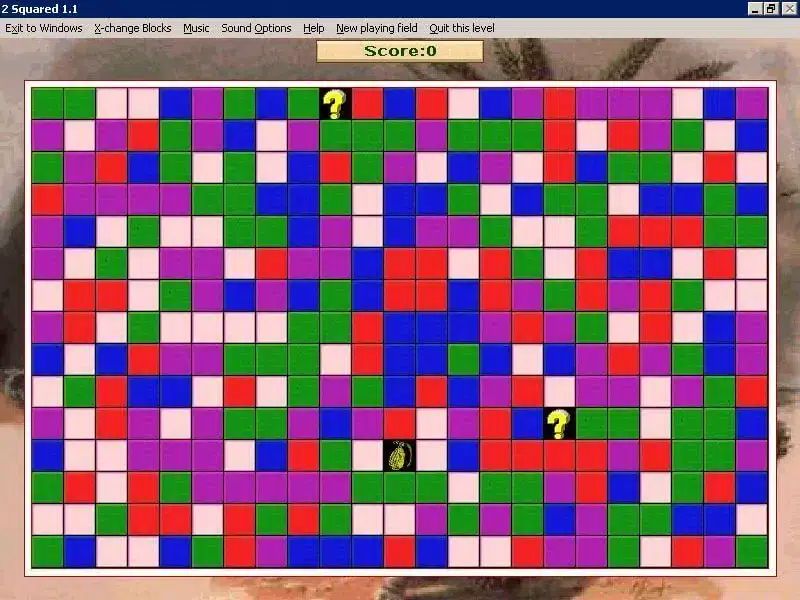
The graphics are ultra-simple but crisp. Colors are easy to distinguish, and the game reacts instantly. It’s not visually impressive—and it doesn’t need to be. It feels like a classic Windows-era puzzle game, and that works just fine.
Challenges and controls
Controls worked flawlessly in our test. Click response is quick, and there are no animations slowing down the gameplay. The main challenge is optimizing your choices and knowing when it pays to let small groups wait to create bigger combos later.
At higher levels, it almost turns into a mini logistics puzzle where you plan several moves ahead.
Strengths and weaknesses
We quickly discovered that 2 Squared is best in short sessions. It’s not a game you’ll sit with for hours, but it’s perfect for quick breaks.
It lacks modern features like a progression system, achievements, or online leaderboards—but if you embrace its retro focus, it’s quite charming.
Top 5 tips for 2 Squared
Plan your combos
Always try to predict which colors will connect when a large group is removed.
Let small clusters wait
Don’t clear small groups early—they often grow into higher-scoring combos.
Work from the bottom
Often clear the bottom rows first. It gives you a better overview.
Create big chain reactions
Aim to clear multiple large groups in a row—that’s the key to a high score.
Watch for single boxes
A single color left alone can ruin a perfect run. Prioritize them early.



