 Martin Jørgensen
Fortnite download: free Battle Royale on PC, console, and mobile
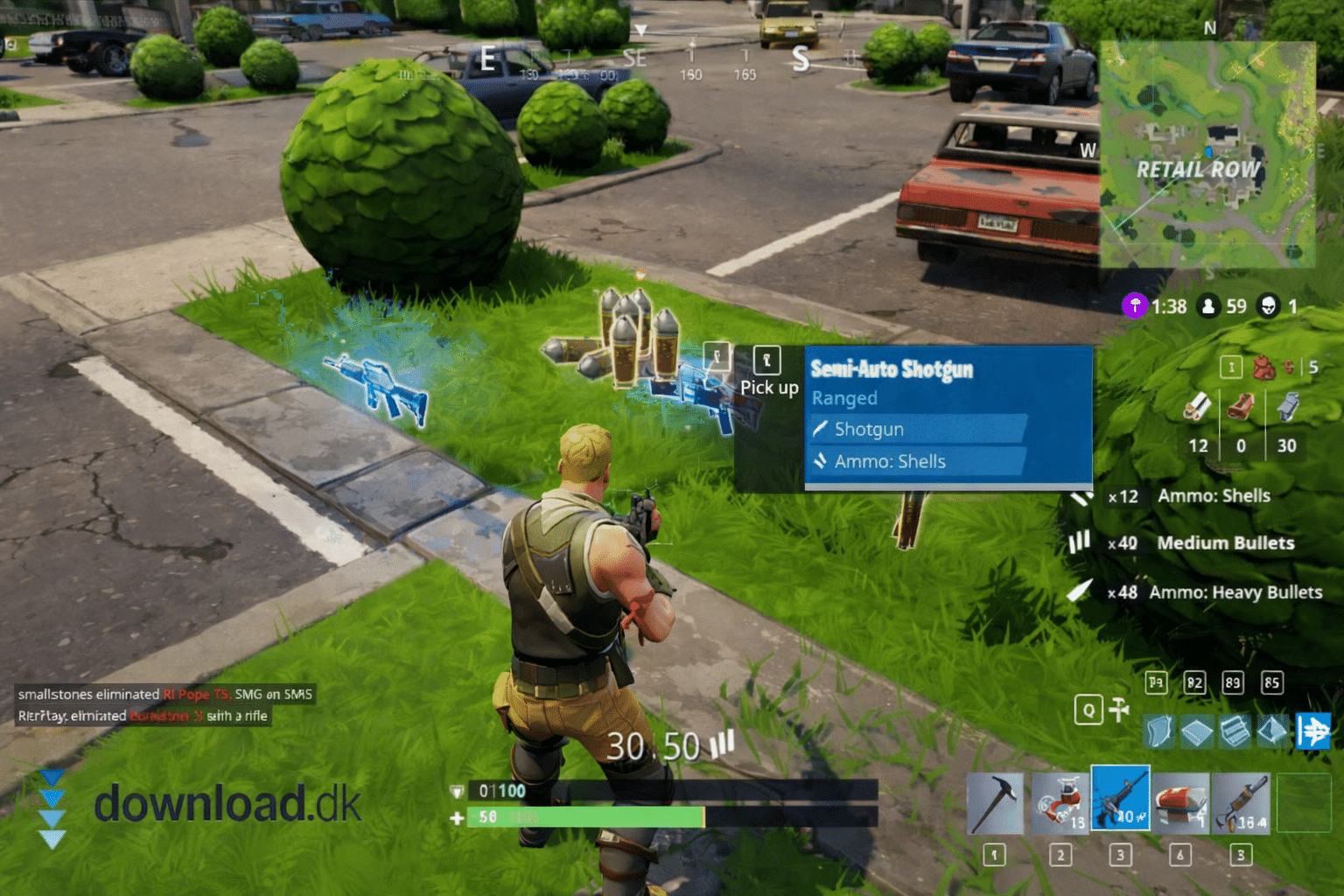
Fortnite is a free, third-person action shooter from Epic Games, where you typically play Battle Royale against other players—solo or in teams—and try to be the last one standing. What makes Fortnite unique is the pace, the ongoing seasons, and full cross-play across platforms.
In our testing on a standard Windows 11 PC, installation was mostly “two clicks and you’re in,” but we also ran into cases where the Epic Games Launcher sometimes needed a restart before updates and anti-cheat fully settled in (a classic Fortnite quirk, especially after big patches).
What is Fortnite today (and why do so many still play it)?

Fortnite first became famous for Battle Royale, but today it feels more like a full platform than “just one game.” You can jump into classic Battle Royale, play without building, or use creative modes where the community makes everything from mini-games to full aim trainers.
In the U.S., Fortnite is still one of the most-played games among kids and teens because it’s free to start—and friends are almost always online across PC, PlayStation, Xbox, and Switch.
Gameplay and modes: Battle Royale, Zero Build, and creative maps
The core is still Battle Royale: You drop onto a large map, loot weapons and gear, and the zone slowly closes in so fights get more intense the longer you survive.
What many new players don’t realize is that you effectively have two “schools”:
- Klassisk Battle Royale med byggeri (Classic Battle Royale with building): You build walls/ramps to gain cover, height, and control in fights.
- Zero Build: Same idea, but with no building—more of a “pure” shooter feel and often easier to get into.
If you want Fortnite without learning 200 build tricks in one night, Zero Build is usually the best place to start.
Building: brilliant – but also why some players drop off

Building is Fortnite’s signature, and when it clicks, it feels great: you can win fights by thinking fast, taking high ground, and outplaying your opponent.
But it’s also where many newcomers (and parents) hit a wall: matchmaking can feel tough if you run into players who’ve played for years. In our tests, the first matches felt fair, but once you reach a certain level, things speed up—especially in build modes.
Graphics, performance, and Fortnite system requirements on PC
Fortnite runs surprisingly well on many PCs, especially if you dial back a few settings. On our test PC (Windows 11), the quickest path to steady FPS was turning off nonessential effects and prioritizing performance/latency over “pretty graphics.”
Practical tweaks that make the biggest difference on PC:
- Use full screen (not windowed) if you want steady FPS
- Turn down shadows and effects before touching resolution
- Update your graphics driver if you get stutter after a patch
- Let the Epic Launcher fully finish updates (it sounds basic, but it’s often the culprit)
Cross-play, friends, and squads: where Fortnite shines

Fortnite thrives when you play together. Queue up as a duo, trio, or squad, and this is exactly where the game feels “as it should”: chaos, laughs, clutch moments, and that classic “one more” feeling.
In practice, Fortnite is also one of the easiest games to play across platforms, so you’re not locked to one console or a single friend group.
Microtransactions, skins, and Battle Pass: pay-to-win or not?
Fortnite is free to play, and the game’s revenue primarily comes from cosmetics: skins, emotes, and the Battle Pass. Most important for new players: you can experience all gameplay without paying, and purchases don’t grant more damage or better weapons.
That said, costs can add up if you (or your child) love skins. In the U.S., it’s smart to enable parental controls or require a purchase PIN on the console or via the platform account, so “small” purchases don’t stack up on autopilot.
Common Fortnite download issues (and quick fixes)
Fortnite is large and updated often, so issues happen. The most common we see (and also hit during testing) are:
- Update stuck in Epic Games Launcher: restart the launcher and check disk space
- Anti-cheat error / game won’t start: restart your PC and run Verify on Fortnite in the Epic Launcher
- Stutter after an update: update your graphics driver and reset graphics settings
- Voice chat not working: check input/output devices in both Windows and Fortnite
Fortnite as an alternative to other Battle Royale games
If you’re searching for “battle royale game download,” Fortnite is usually the most versatile choice because it includes shooting, building, and a huge range of community modes.
If you want more realistic gunplay, many look at alternatives like Apex Legends or Call of Duty (Warzone). Fortnite wins on creativity, pace, and the low barrier to start playing free with friends.
Top 5 tips for Fortnite
Small tweaks that usually mean more wins, fewer “back to lobby” moments, and a better start for new players—especially on PC.
Start in Zero Build if you’re new
You’ll learn loot, rotations, and fights without the stress of building. Once aim and awareness click, try build modes after.
Lower effects before lowering resolution
On PC, shadows/effects often cause stutter. Start there and keep resolution higher so you can still spot enemies at range.
Land in the same spot for your first 20 matches
Once you know an area, you’ll find chests faster and leave with better weapons. It’s the easiest shortcut to a stronger early game.
Play safe mid-game — aggressive in the final circles
Most deaths come from sloppy third parties. Keep rotations simple, take only favorable fights, and save the tempo for the last zones.
Duos/squads teach faster than solos
You get callouts, revives, and more “chances” in a single match. In our testing, we improved notably faster in duos than in solos.
Fortnite – FAQ