
 Martin Jørgensen
Pingus – Free puzzle game inspired by Lemmings
Pingus is a fun and challenging puzzle game for Windows, Mac, and Linux, where you guide little penguins through hazardous levels filled with obstacles. Inspired by the classic Lemmings, it adds its own unique twist and a charming, cartoon-style look.
Gameplay and features
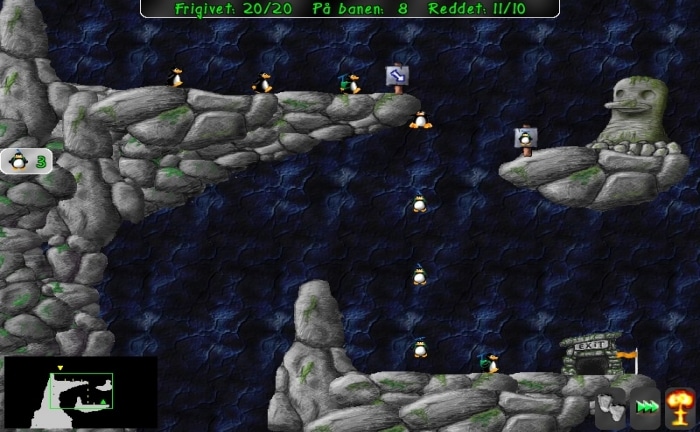
The goal in Pingus is to guide your penguins safely through each level by assigning different abilities—such as digging, building bridges, or gliding. Every level requires planning and timing, since you only have a limited number of abilities available.
We tested the game on a Windows 7 64-bit PC, where it ran smoothly without errors. It’s a title that will especially appeal to fans of classic strategy and puzzle games.
Graphics and audio
While Pingus keeps the visuals simple, they fit the game’s humorous and cozy vibe perfectly. The music and sound effects are cheerful and relaxing—just what you’d expect from a penguin game in the starring role.
Challenges and controls
Controls are easy with the mouse, and new players quickly learn how to issue commands to the little characters. The first levels serve as a solid introduction, while later ones become significantly more demanding.
There are hours of entertainment here, and even though the game isn’t updated often anymore, it still has a dedicated online fan base.
Top 5 tips for Pingus
While it may be tempting to jump straight into the tough levels, you’ll master the core mechanics faster by starting with the simple ones. The early levels act like a tutorial that helps you learn each ability.
You only have a limited number of abilities on each level—like digging or building. Plan the order in which you’ll use them so you don’t run out during a crucial section.
Use the zoom feature to see the entire level at once. It helps you spot hazards, drops, and alternate routes before sending your penguins on their way.
There’s often more than one way to beat a level. Don’t be afraid to experiment—sometimes an unexpected strategy works better than the obvious one.
Some versions of Pingus let you save your progress. Use it—especially before tackling tough sections—so you don’t have to start all over again.



