
 Martin Jørgensen
Python — download and install the programming language for Windows/Mac
Python is one of the world’s most popular programming languages, used for everything from automation and data analysis to web development and AI. If you want to get started on Windows 11, macOS, or Linux, the easiest path is to download Python from the official source and set it up correctly the first time (so pip and the terminal work smoothly).
What do people actually use Python for?
If you’ve heard of Python, you’ve probably heard someone say “you can use it for anything.” That’s not totally wrong — but in reality, most people end up using Python for a few very concrete tasks.
We especially see Python used to save time on repetitive tasks. That could be anything from renaming 500 files at once, cleaning up the Downloads folder, or pulling numbers out of a spreadsheet without copy/pasting for hours. Those everyday “utility scripts” are often where Python delivers the most value because you get visible results fast.
Then there’s data and numbers. If you work with CSV files, reports, budgets, or just want to analyze something (for example, sales figures or a dataset from the web), Python is one of the most popular shortcuts to clean data and make charts without drowning in manual Excel work.
And yes — web and AI matter too. But here’s the key: you don’t have to start with “AI” to benefit from Python. Many people begin with small scripts and later build a simple web app or automate something via APIs once they get a taste for it.
Installing on Windows 11: the mistake we keep seeing
During our testing on a typical Windows 11 PC, the installation itself was quick, but we also hit the classic issue many run into: Python installs fine — but afterward it doesn’t work in PowerShell/Command Prompt because PATH isn’t set.
It’s a bit like installing a program and forgetting to create a shortcut: it’s there, but you can’t “find” it from the terminal.
If you want to avoid hassle, three things make all the difference from the start:
- Make sure Python can be run from the terminal (PATH)
- Check that pip works so you can install packages
- Use an editor that helps as you code (VS Code is the obvious choice for most)
If you skip PATH, you can still fix it later — but that’s exactly where many end up in the “why doesn’t python work” spiral.
Python and packages: why pip and venv quickly become essential
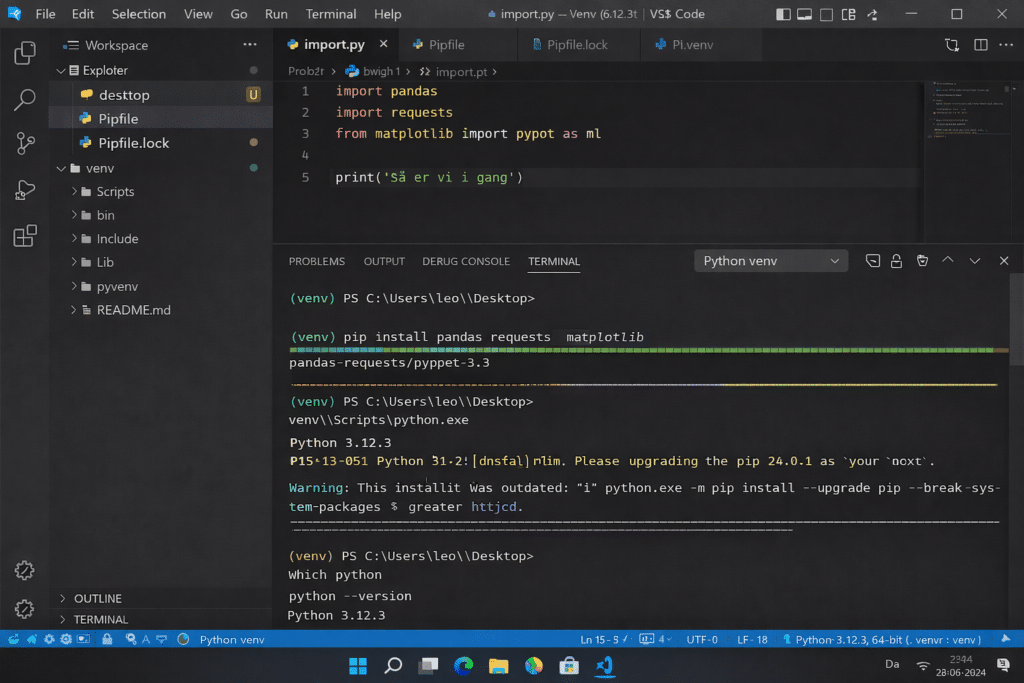
The moment you type “pip install …” for the first time, Python really opens up. That’s where you gain access to the tools that make Python powerful: data libraries, web frameworks, automation — everything.
But pip is also where things can get messy if you install everything globally. We’ve seen many projects get confused because old packages conflict with new ones — and that’s exactly why venv exists.
In short: venv gives each project its own little “mini‑Python,” so you don’t break something by accident.
Python vs. alternatives: when does Python make the most sense?
Python is best when you want to get started quickly, learn programming without tripping over syntax, or build something that automates a task. It’s also a strong choice if you want to work with data.
If you mainly want to build web front‑ends, JavaScript is often more direct. And if you’re building large, heavily structured systems, C# or Java can be a more natural enterprise choice. Python can still be used there — but it’s not always the most obvious first tool.
Top 5 tips for Python
If you want to type “python” in PowerShell/Terminal, Python must be on your PATH. It’s the most common reason it “doesn’t work” afterward.
When pip is working, you can install libraries without drama. If installs fail, it’s often pip/the environment — not your code.
venv gives each project its own environment. It feels like a small detour at first, but it saves you from classic “it worked yesterday” errors.
Autocomplete, imports, and small mistakes get caught early. It makes the learning curve much smoother, especially when you’re new.
Many problems come from running the “wrong” Python or activating the wrong venv. Check that before digging into your code.
If you just want “python download” and to go from 0 to script fast, PATH + pip + venv is the shortest route to a stable setup.



