 Martin Jørgensen
RollerCoaster Tycoon 3 – build your own theme park
RollerCoaster Tycoon 3 is a classic simulation and strategy game where you create your own theme park, design wild roller coasters, and try to turn a profit on everything from admission tickets to hot dogs and umbrellas.
Remember spending an entire evening building one coaster, only to find out your guests thought it was way too scary? That’s exactly the kind of moment that makes RollerCoaster Tycoon 3 so entertaining, even many years after its original 2004 release.
Today, the game is also available as a Complete Edition, making it easier to relive the classic on modern computers. And while the graphics do show their age, it’s still incredibly satisfying to watch a small park grow into a theme-park empire.
Download RollerCoaster Tycoon 3 – free demo or full version?
There’s an important difference between the old demo and the full Complete Edition.
The old demo still exists in Download.dk’s archive, but it was built for much older versions of Windows. Therefore, we can’t guarantee it will work properly on Windows 10 or Windows 11.
We generally recommend the Complete Edition, which you can buy via Steam or GOG. GOG also offers the game DRM‑free, so it doesn’t require ongoing online activation.
Build roller coasters that make guests scream
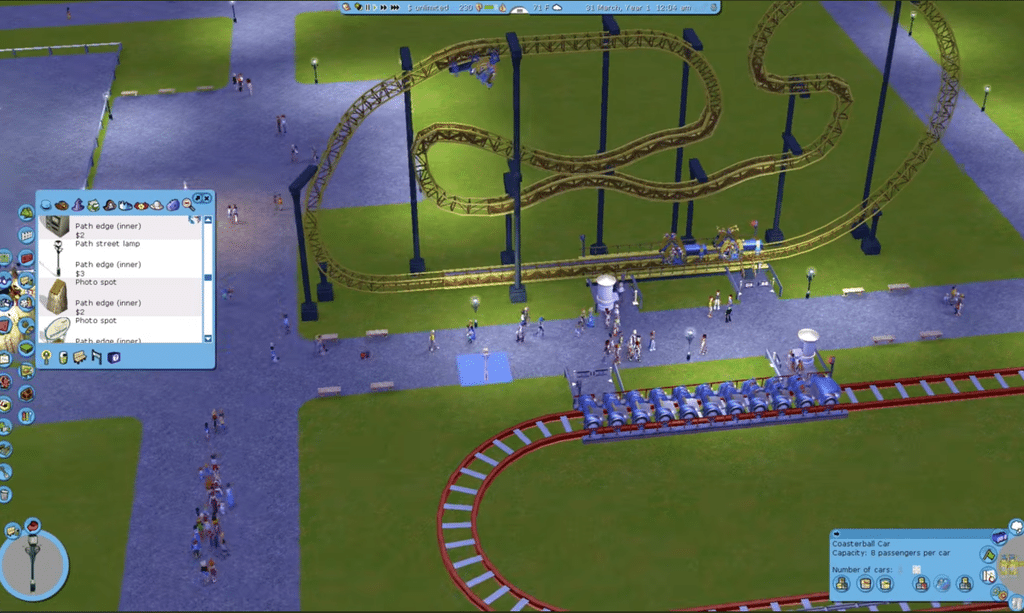
The most entertaining part of RollerCoaster Tycoon 3 is without a doubt the freedom to build your own rides.
You can construct coasters with steep drops, sharp turns, loops, and surprising sections that send guests flying through the park at high speed.
But you can’t just build the wildest coaster and expect everyone to line up.
The game rates rides by excitement, intensity, and nausea. A coaster can be impressive without being popular.
This creates a fun balance between creativity and planning. Sometimes a relatively simple family coaster performs much better than the huge build you spent half an hour creating.
A particularly fun feature is the ability to experience rides in first-person view. It gives a whole new perspective on your designs when you can take the ride yourself.
Manage your theme park’s finances
Great coasters alone won’t get you far. Guests also need food, bathrooms, and well-laid paths to move around.
In RollerCoaster Tycoon 3 you’ll manage, among other things:
- Admission prices, ticket revenue, and expenses.
- Food stalls, drinks, souvenirs, and umbrellas.
- Janitors, mechanics, and security guards.
- Guest satisfaction, queue lengths, and park reputation.
- Loans, new investments, and expansions.
One small pleasure is experimenting with prices. Set them too high and guests complain. Too low, and you leave money on the table.
And yes, rainy weather is a perfect time to sell more umbrellas.
RollerCoaster Tycoon 3 language options
On Steam, the Complete Edition includes an English interface (and additional languages), which makes the game easier to navigate for kids and newer players.
It’s also a great game to play together with children. It’s not about twitch reflexes or shooting opponents, but about creativity, budgeting, and problem solving.
There’s plenty to discuss together: which rides to build, where shops should go, and why guests suddenly seem unhappy.
Complete Edition with water parks and a zoo
Complete Edition includes two large expansions that add much more variety.
Soaked! lets you build water parks with pools, water slides, and other aquatic activities. It’s a cozy change of pace from traditional rides.
Wild! adds zoos and animal areas, letting you combine park management with animals and different enclosures.
Both expansions are included in the Complete Edition, so there’s nothing extra to buy.
RollerCoaster Tycoon 3 on Windows 10, Windows 11, and Mac
Complete Edition is available for both Windows and macOS. The official Windows minimum requirements are quite modest:
| Component | Minimum requirements |
|---|---|
| Processor | Intel or AMD Dual Core |
| RAM | 2 GB |
| Graphics card | 256 MB graphics or Intel HD 4000 |
| Storage | 2 GB |
| DirectX | Version 9.0 |
The Steam client requires Windows 10 or newer, and the updated Complete Edition is generally a better choice for modern PCs than the old demo.
Note that official macOS support depends on your exact version and hardware. Be sure to check compatibility with newer Apple Silicon Macs before purchasing.
Is RollerCoaster Tycoon 3 still worth playing?
Yes—especially if you enjoy classic strategy games where you set your own pace.
It’s certainly not the prettiest theme-park game anymore. The camera and some building tools can feel dated compared to newer titles like Planet Coaster.
But RollerCoaster Tycoon 3 has a charm that’s hard to replace.
There’s no need for constant updates, live events, or complex online systems. You just build your park, solve problems, and try to make it a little better.
And suddenly three hours have flown by.
Top 5 tips for RollerCoaster Tycoon 3
1. Start with a few profitable rides
Build a solid economy from the start
It’s tempting to open with the park’s biggest coaster, but that can drain your funds fast. Start instead with a couple of smaller rides, bathrooms, and food stalls.
Our tip: Track revenue from each ride. Only expand once the park is consistently earning money.
2. Listen to guest complaints
Use guest thoughts as free advice
Guests will tell you quite clearly what’s wrong with your park. Maybe ticket prices are too high, queues are too long, or bathrooms are too far away.
Our tip: Check guest thoughts regularly. If many complain about the same thing, fix it before you keep building.
3. Test coasters before opening
The wildest coaster isn’t always the best
RollerCoaster Tycoon 3 rates your coasters by excitement, intensity, and nausea. A track with extreme drops and loops can end up scaring guests away.
Our tip: Use the test function and tone down the most extreme turns and drops if intensity is too high. A slightly calmer ride can be more popular.
4. Build freely in Sandbox Mode
Unleash creativity without budget worries
Want to design a massive park with giant coasters, a water park, and a zoo? Sandbox Mode is the perfect place to start.
Our tip: Use Sandbox Mode to test new builds and learn the construction tools. Once you’ve got the mechanics down, the campaign’s budgeting challenges become much easier.
5. Place shops strategically
Earn more from food, drinks, and umbrellas
A hot-dog stand in the middle of nowhere rarely becomes a gold mine. Place shops along main paths, near popular rides, and in high-traffic areas.
Our tip: Watch umbrella sales when the rain starts. Also add trash cans, benches, and janitors so guests stay in the park longer.